
Validate Cart
Validate Cart outlines the process of validating a cart submitted by an integration partner.
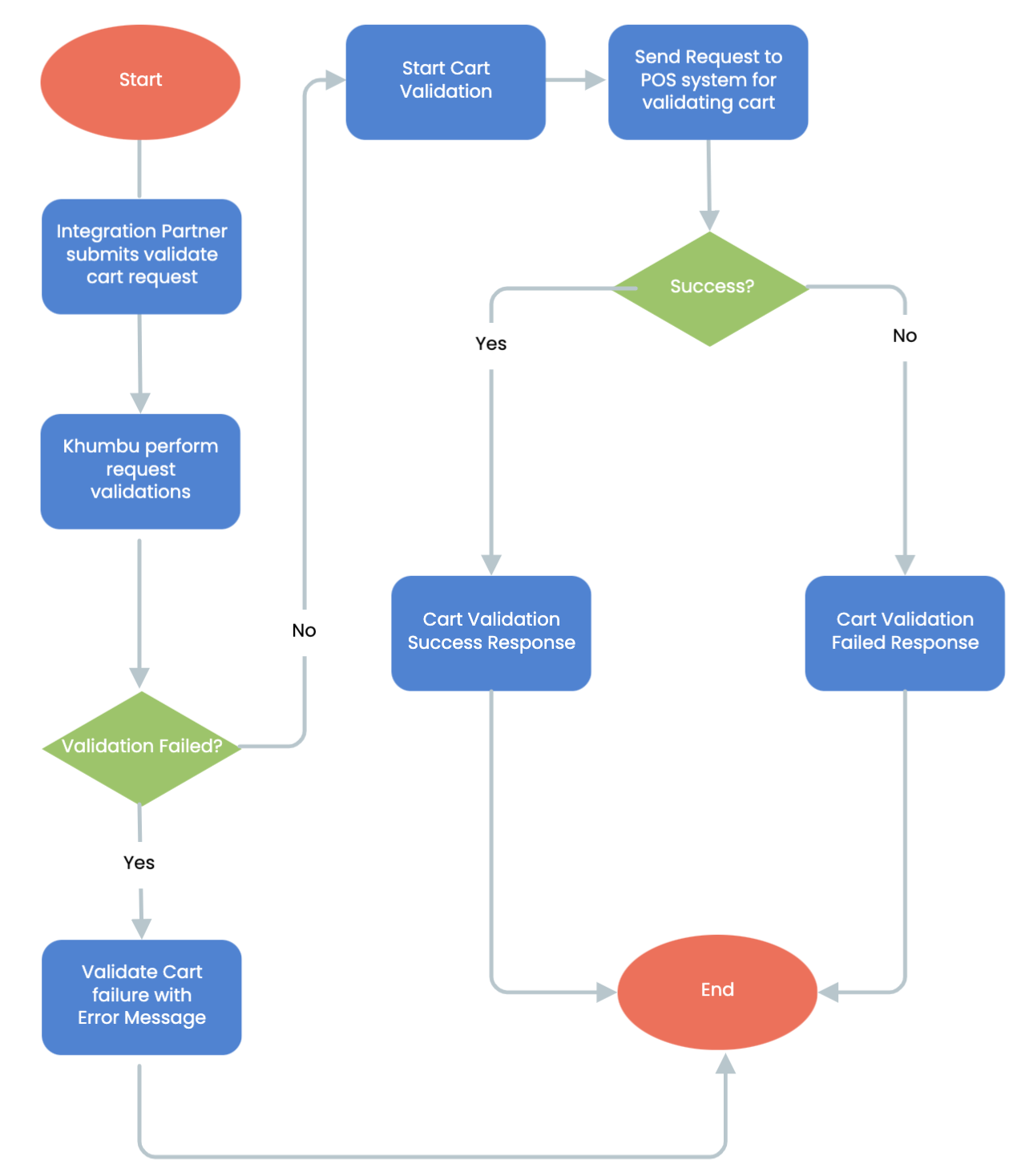
Validate Cart Workflow Steps:
- Start Validate Cart Workflow
The workflow begins when the integration partner submits a cart validation request to the system. - Integration Partner Submits Validate Cart Request:
The API request to validate a cart is received by Khumbu system - Khumbu Performs Request Validations:
- Khumbu performs preliminary checks on the incoming request to ensure it is valid and well-formed.
- Decision Point:
Validation Failed: If the request validation fails, the process terminates, and the integration partner is informed of the failure with an error message.
Validation Passed: The workflow proceeds to the next step.
- Start Cart Validation:
The cart is prepared for validation and sent to a POS system for further processing. - Send Request to POS system to Validate Cart:
- A request is sent to the POS system to validate the cart.
- Decision Point:
Success: The cart validation succeeds, and the workflow proceeds with a success response.
Failure: The cart validation fails, and the appropriate failure response is generated.
- Cart Validation Success:
If the POS system confirms that the cart validation is successful, the status is updated to reflect this. - Cart Validation Failed:
If the POS system indicates that the cart validation has failed, the integration partner is informed of the failure through a webhook. - Update Integration Partner with Cart Details on Webhook:
The system sends the final cart validation status (success or failure) to the integration partner using a webhook for real-time updates. - End of Validate Cart:
The workflow concludes after the integration partner has been notified of the final cart validation status.
Key Features in Validate Cart
- Request Validation:
Ensures that the incoming cart validation requests adhere to the required format and parameters before further processing. - POS system Integration:
Utilizes POS systems for cart validation, ensuring reliability and scalability. - Webhook Notifications:
Provides asynchronous status updates, ensuring the integration partner is informed in real-time about the validation outcome. - Error Handling:
Manages failures both in request validation and cart validation, ensuring appropriate error messages are communicated to the integration partner for troubleshooting.
Updated over 1 year ago
Did this page help you?