
Cancel Order
The Cancel Order APIs allow integration partner to cancel orders.
Below is the Order Cancellation Workflow, which outlines the steps for handling a integration partner's request to cancel an order.
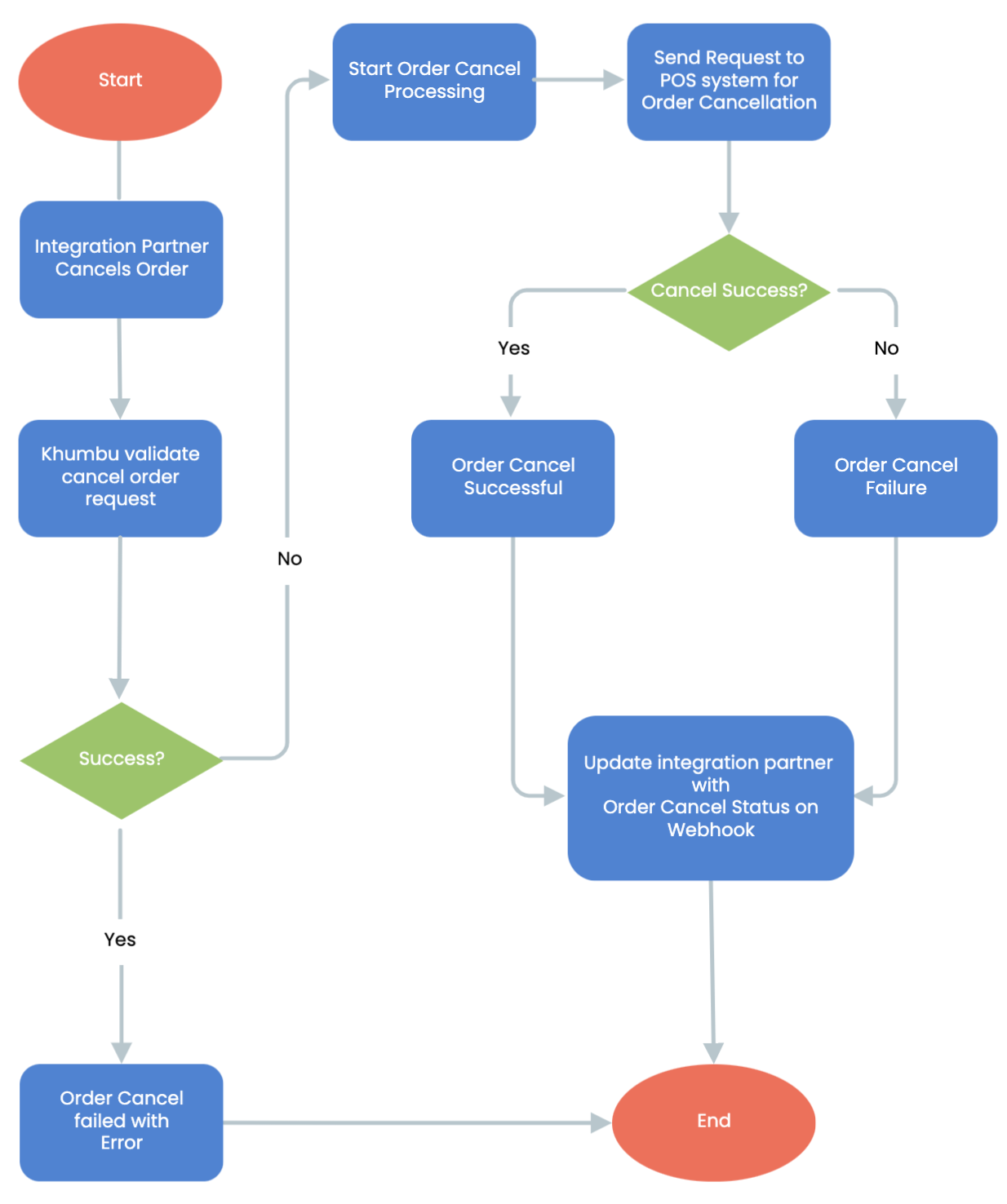
Order Cancel Workflow Steps:
- Start of Cancel Order workflow:
The process begins when a integration partner initiates an order cancellation request. - Integration Partner Cancels Order:
The integration partner submits an API request to cancel an order. - Khumbu Validates Cancel Order Request:
- The system validates the cancellation request to ensure it is valid and meets the required criteria.
- Decision Point:
Validation Failed: If the request validation fails, the process terminates, and the integration partner is informed of the failure with an error message.
Validation Passed: If the validation succeeds, the workflow proceeds to the next step.
- Start Order Cancel Processing:
The validated cancellation request enters the processing stage. - Send Request to POS system for Order Cancellation:
- A request is sent to the POS system to process the order cancellation.
- Decision Point:
Cancel Success: If the POS system confirms that the cancellation was successful, the order is marked as canceled, and the status is updated.
Cancel Failure: If the POS system indicates that the cancellation failed, the appropriate failure response is generated.
- Order Cancel Successful:
If the cancellation is successfully processed, the workflow moves to notify the integration partner. - Order Cancel Failure:
If the cancellation request fails, the workflow prepares an error response to inform the integration partner. - Update Integration Partner with Order Cancel Status on Webhook:
The system sends the final order cancellation status (success or failure) to the integration partner via a webhook, ensuring real-time communication. - End of Order Cancel:
The workflow concludes after the cancellation status has been communicated to the integration partner.
Key Features in Order Cancel
- Request Validation:
Ensures the cancellation request is valid and meets all necessary conditions before proceeding. - POS system Integration:
Relies on POS systems for processing order cancellations, ensuring streamlined operations. - Webhook Notifications:
Provides asynchronous updates to the integration partner about the success or failure of the cancellation request. - Error Handling:
Clearly manages failure scenarios in both request validation and POS system cancellation processing, ensuring appropriate error messages are sent to the integration partner.
This workflow ensures an efficient and robust process for handling order cancellation requests, supporting data integrity and providing real-time updates to integration partners in an API-driven environment.
Updated over 1 year ago
Did this page help you?