
Create Order
The Order APIs allow integration partners to create and manage orders, adjusting order details as necessary. These endpoints are designed to support real-time order processing and updates within your integration.
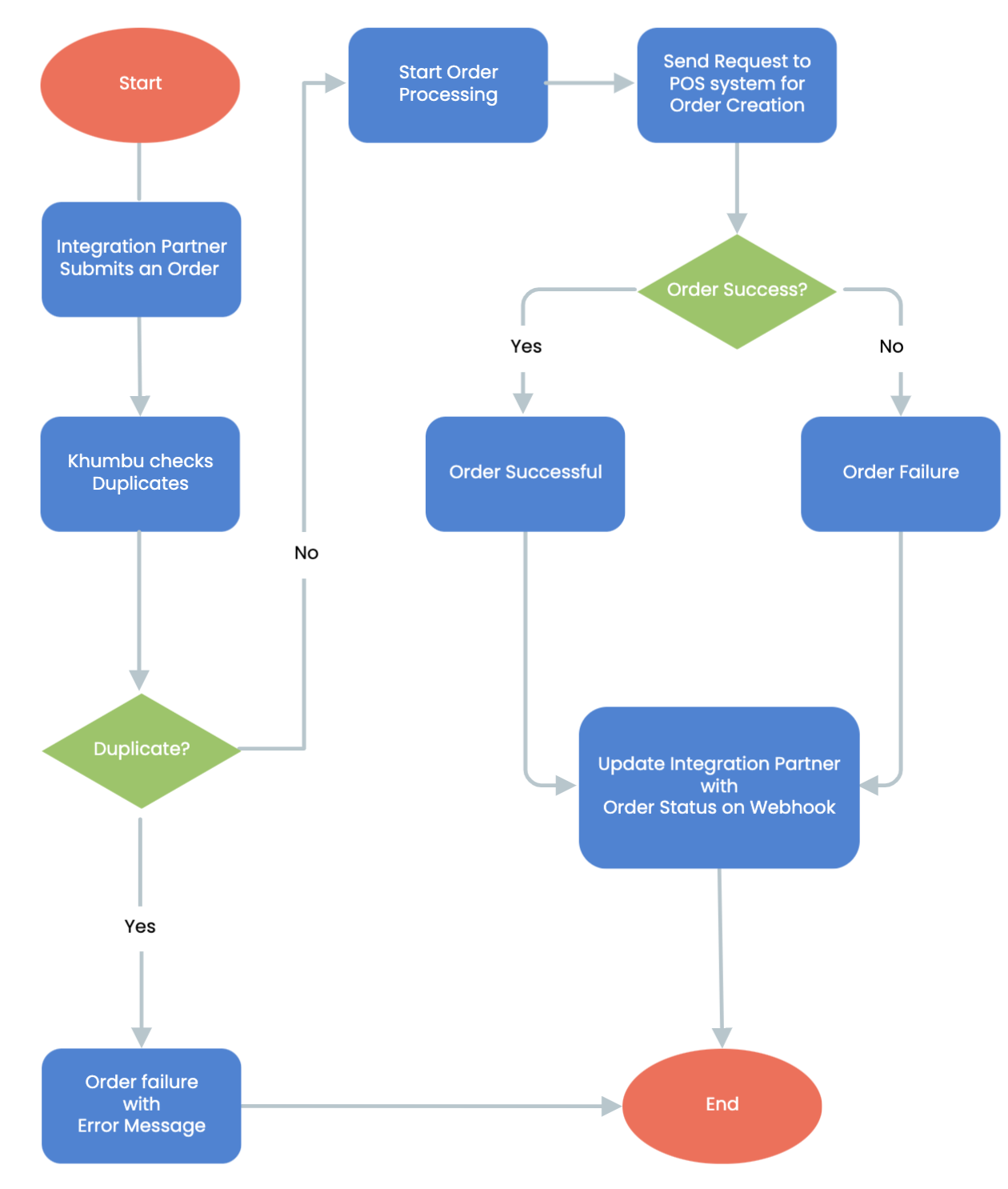
Create Order Workflow Steps:
- Start of Create Order workflow
The workflow is initiated when an integration partner submits an order request to the system. - Integration Partner Submits an Order:
The API request is received by Khumbu system and triggers the order processing sequence. - Khumbu Checks for Duplicates:
- The system validates whether the submitted order is a duplicate based on predefined rules.
- Decision Point:
Duplicate Found: The process terminates, and an error response is returned to the integration partner with the appropriate message.
No Duplicate Found: The workflow continues to order processing.
- Start Order Processing:
The validated order enters the processing stage to be forwarded for creation. - Send Request to POS system for Order Creation:
- A request is sent to the POS system to create the order.
- Decision Point:
Order Success: The POS system confirms successful order creation, and the status is updated.
Order Failure: The POS system indicates failure, triggering an error response.
- Update Integration Partner with Order Status on Webhook:
The system uses a webhook to send the final order status (success or failure) back to the integration partner. This ensures real-time communication and status tracking. - End of Order Processing:
The workflow concludes after the order status has been communicated to the integration partner.
Key Features in Create Order
- Duplicate Check:
Ensures no duplicate orders are processed, maintaining data integrity. - POS system Integration:
Leverages POS systems for order creation, enhancing scalability and functionality. - Webhook Notifications:
Provides asynchronous status updates to the integration partner, ensuring clear communication. - Error Handling:
Explicitly manages failure scenarios with detailed error messages, aiding troubleshooting.
Khumbu ensures a streamlined order management process, supporting scalability, robustness, and real-time updates in API-driven systems.
Updated over 1 year ago
Did this page help you?