
Fire Order
Fire Order is triggered after an order has been created with orderNotificationType set to HOLD. The process ensures that orders are correctly fired to the POS system and updates the integration partner accordingly.
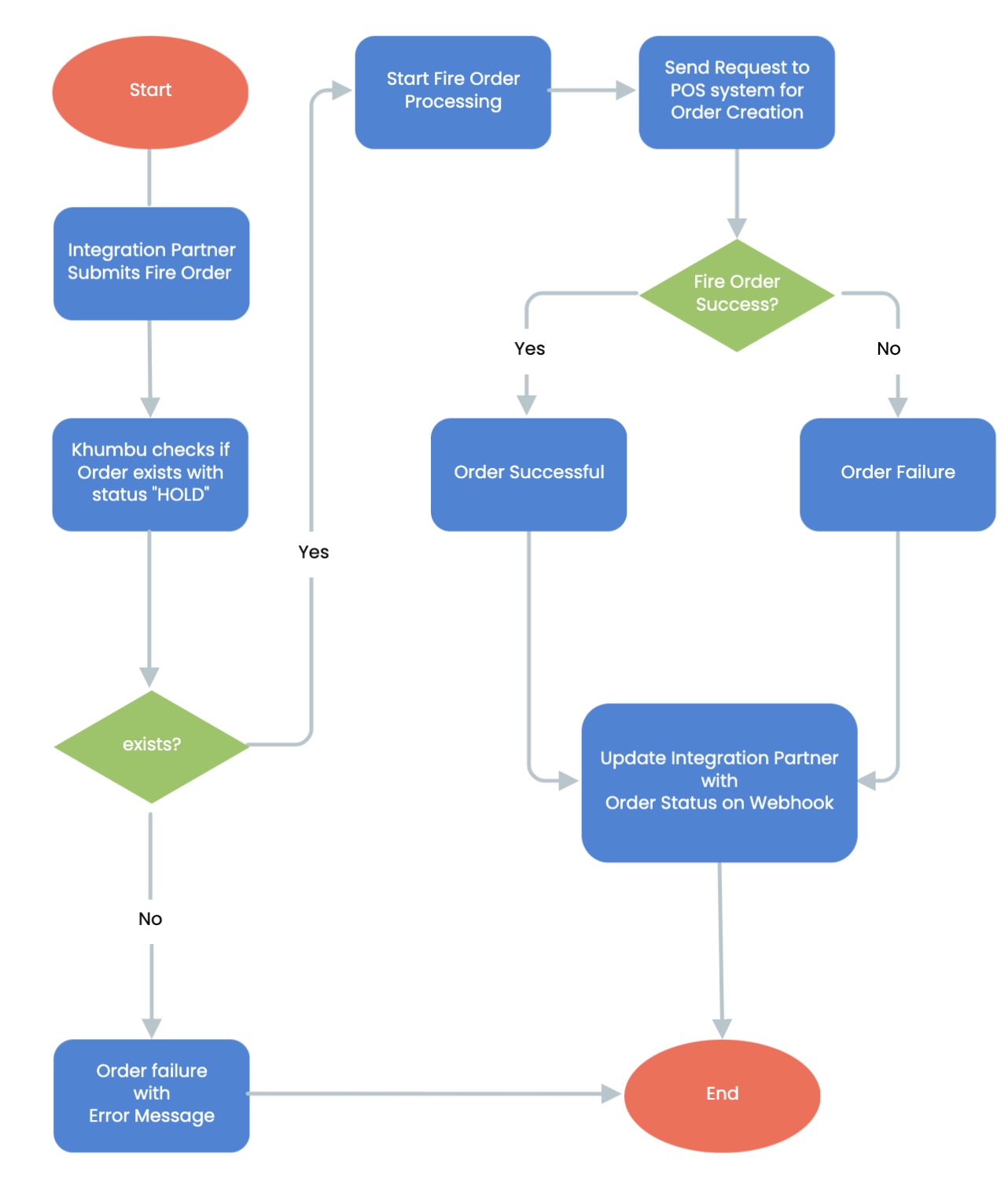
Fire Order Workflow Steps:
- Start of Fire Order
The workflow begins after an order has been created as initial step and then placed/updated status on HOLD.
- Integration Partner Submits Fire Order
The integration partner triggers the fire order process by submitting a request to move the order from HOLD to active processing.
- Khumbu Checks if Order Exists with Status "HOLD"
- The system verifies whether the order exists and is currently in the HOLD state.
- Decision Point:
Yes: If the order exists with the correct status, the fire order process proceeds.
No: If the order does not exist or is not on HOLD, the request fails with an error message.
- Order Failure with Error Message
If the order does not exist or is not in the correct status, an error message is generated, and the process ends.
- Start Fire Order Processing
If the order exists in the HOLD status, Khumbu initiates the fire order process.
- Send Request to POS System for Order Creation
The order details are sent to the POS (Point of Sale) system for processing.
- Fire Order Success?
- The POS system responds with the success or failure of the order creation.
- Decision Point:
Yes: The order is successfully processed.
No: The order fails to be created in the POS system. - Order Successful: If the fire order is successfully processed, it is marked as completed.
- Order Failure: If the fire order fails at the POS system level, an error is logged, and the integration partner is informed.
- Update Integration Partner with Order Status on Webhook
The integration partner is notified of the order status (success or failure) via webhook.
- End of Fire Order Processing
The workflow concludes after the integration partner is updated.
Key Features
- Validation Check:
The Fire Order workflow consists of two main steps, ensuring controlled order creation and fire order execution. Ensures only valid orders in HOLD status proceed to fire order processing. - POS System Integration:
Sends fire order requests directly to the POS system for order execution. - Webhook Notifications:
Keeps integration partners updated on order status in real time. - Error Handling:
Provides clear error messages when an order does not exist or fails to process.
Updated over 1 year ago