
Fetch Menu
The Fetch Menu endpoint allows integration partners to fetch menu information, including changes to items, prices, and categories, for a specified store in the Khumbu platform. This endpoint ensures that the POS system's menu stays synchronized across all integration partner systems.
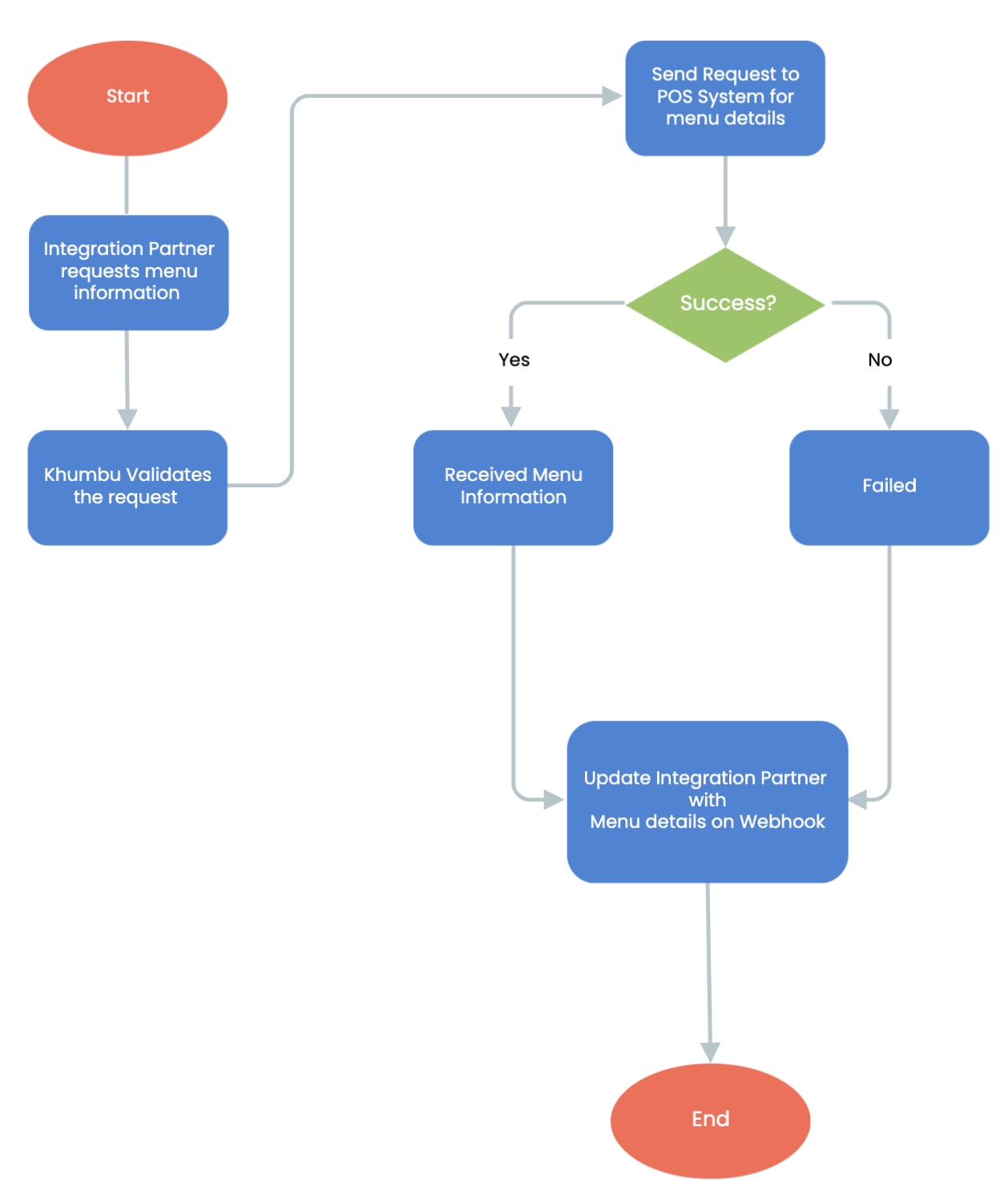
Fetch Menu Workflow Steps:
- Start Fetch Menu Workflow:
The process begins when a integration partner requests menu information. - Integration Partner Requests Menu Information:
The integration partner initiates an API request to retrieve menu details. - Khumbu Checks for POS System details and Integration Partner details:
- The system verifies the validity of the request and confirms that the required POS system and integration partner details are available.
- Decision Point:
If the details are missing or invalid, the process may terminate or fail at a later step.
- Send Request to the POS system for Getting Menu Details:
- Once the request is validated, it is forwarded to the POS system responsible for providing menu details.
- Decision Point:
Success: If the POS system successfully provides the menu information, the workflow proceeds to update the data to the integration partner.
Failure: If the POS system fails to provide the menu information, an error response is generated.
- Received Menu Information:
If the POS system returns the requested menu details, the system processes and prepares the information for delivery. - Failed to receive Menu Information:
If the POS system cannot provide the requested details, the system prepares an error response to notify the integration partner of the failure. - Update Integration Partner with Menu Details on Webhook:
The system sends the retrieved menu details (or the failure notification) to the integration partner using a webhook, ensuring real-time communication. - End of Fetch Menu:
The workflow concludes after the integration partner is updated with the menu details or notified of the failure.
Key Features in Fetch Menu
- Request Validation:
Ensures the integration partner's request is valid and contains all necessary details before forwarding to the POS system. - POS system Integration:
Fetches accurate and up-to-date menu information directly from POS systems. - Webhook Notifications:
Provides real-time updates to the integration partner about the success or failure of the menu retrieval process. - Error Handling:
Manages scenarios where the POS system fails to provide the menu details, ensuring clear and actionable error messages for the integration partner.
Updated over 1 year ago
Did this page help you?